
Site operations · Android + Web

From site work.
To a clear view.

Field reports, material tracking and site progress — built for road-construction and infrastructure contractors.

Illustrative construction scene: a supervisor in a hard hat and safety vest with paving machinery behind
NH-16 Pkg BChainage 134+200Work Front B · illustrative
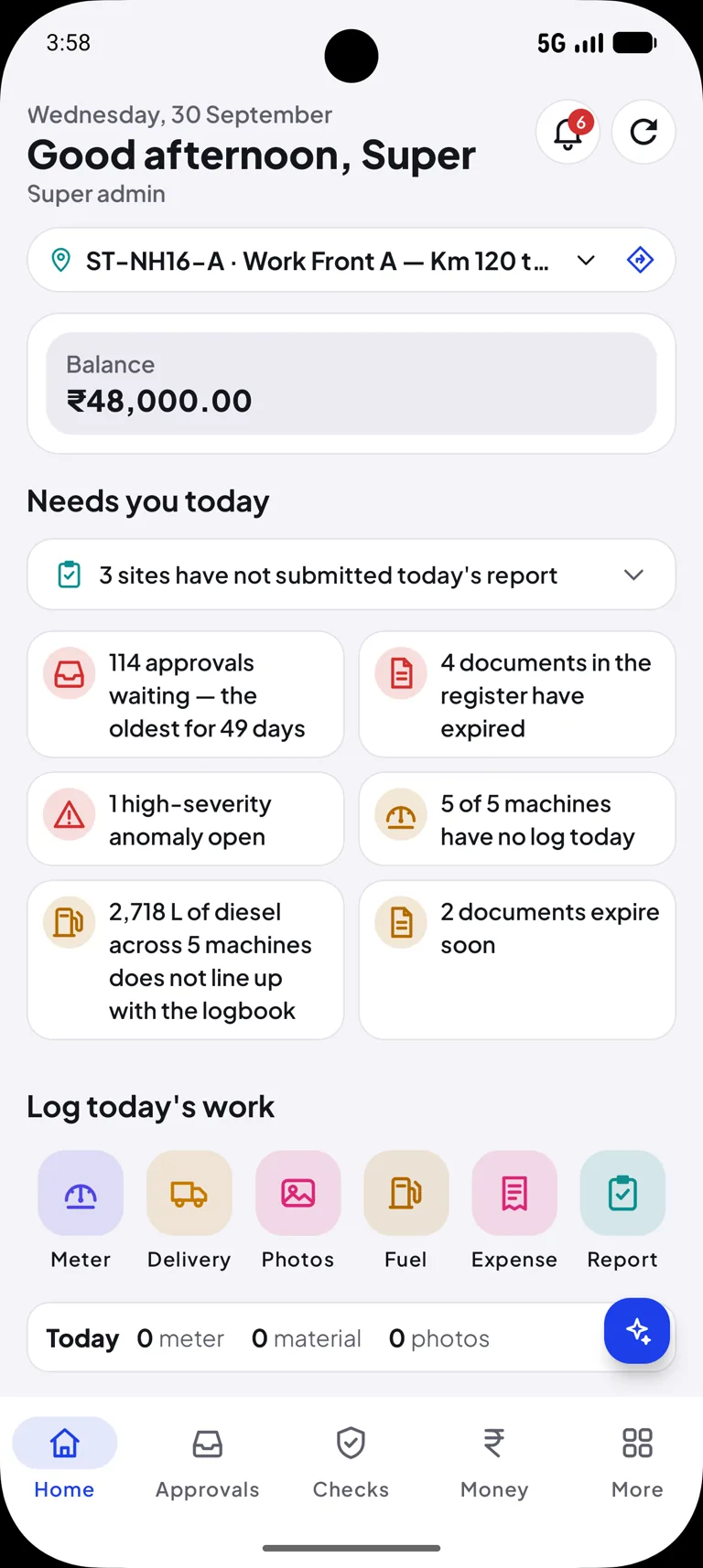
SiteMax Android app — Home screen, open on site — demo profile Asish
Material receipt · sample
12.80 MTBitumen VG-30 · CH-88421Captured at Ch 134+200
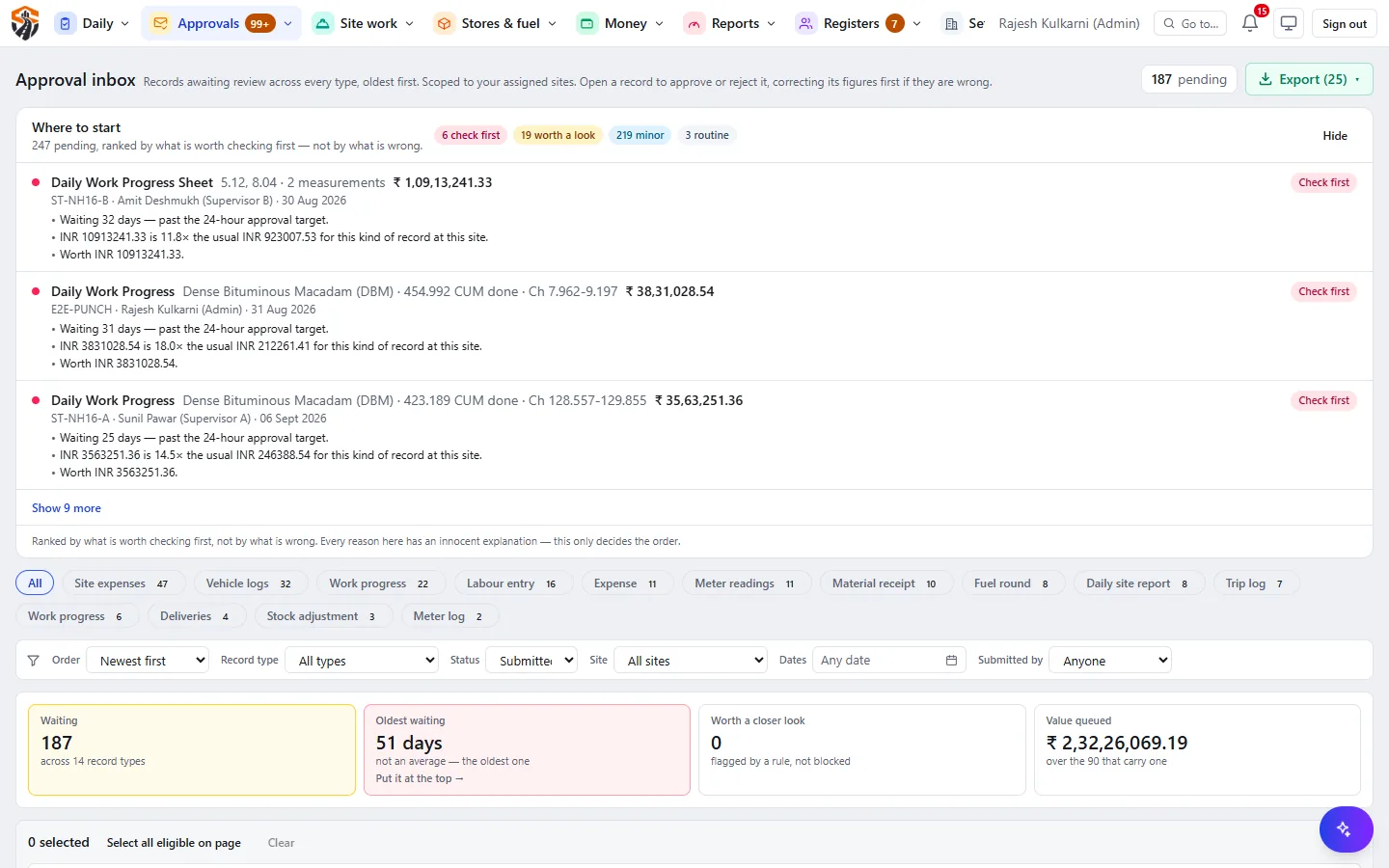
SiteMax office approvals inbox — demo-environment records
Explore the real product screens →

Android for the site. Web for the office. Company-issued access · app screen shows demo-environment data. Construction scene is AI-generated.

  • Daily site reports
  • Attendance with face & GPS
  • Labour & wages
  • Work progress by chainage
  • BOQ & RA bills
  • Material receipts & stock
  • Fuel & machine logs
  • Expenses & imprest
  • One-tap approvals
  • Supplier & transporter ledgers
  • Nightly WhatsApp summary
  • Android for the site, web for the office
01

Offline field capture

Supported entries queue on the phone and sync later.

02

Named approval workflows

Each record goes to an assigned approver.

03

Permission-controlled financials

Costs, rates and margins shown only to those allowed.

04

Audited records and corrections

Every creation, change and approval is recorded.

The flow

Recorded here.
Reviewed there.

From a field entry to an office decision, SiteMax keeps one record of what happened — who recorded it, who checked it, and what it changed.

  1. 01

    Capture

    Progress, labour, materials, fuel and photos, recorded against a site and chainage.

  2. 02

    Sync

    Supported entries queue on the phone with no signal and sync when it returns.

  3. 03

    Review

    A named approver claims the record, then corrects, approves or rejects it.

  4. 04

    Control

    Approved records become progress, stock, cost and client billing.

SiteMax Android app — Home screen, where a site entry is recorded — demo profile Asish
Saved on device
Material receipt
12.80MT
Bitumen VG-30
Site
NH-16 Pkg B
Chainage
Ch 134+200
Challan
CH-88421
Vehicle
MH12 AB 4687
CapturedSaved on device
SiteMax web app — Materials screen, where a delivery is reviewed
Awaiting an approver

Illustrative sequence · sample data · simulated transfer

The outcome

Every site.
One clear view.

Progress and project costs from approved records, alongside pending approvals, attendance and cash balances — across every site.

Book a Demo →

SiteMax web dashboard · demo-environment data

Illustrative rule examples · sample data

Know what needs attention before it gets missed.

Rule-based checks run on a schedule and compare records against thresholds your company sets. Each exception names the rule that raised it and the person it is assigned to, and is closed with a note that stays on the record. No predictive model decides what is wrong.

Rule · DPR due by 20:00

NH-16 Pkg B and Ring Road Ph-2 have no daily report for today. The check runs every evening after the filing deadline your company set.

Assigned toProject manager
In the product

What the office
actually does.

Three of the workflows a day runs through, each on the screen that performs it.

01 Approvals

Nothing is approved anonymously.

Every entry from the field lands in one inbox and leaves it with a name against it.

  • A record goes to a named approver, who claims it before reviewing — so two people cannot act on the same one.
  • A correction is made with a reason, and both the original and corrected value stay in the audit trail.
  • Approve, reject with a reason, or clear a run of straightforward records in bulk.
  • An approved record can still be reopened or reversed, through a controlled workflow.
SiteMax web app — the approvals inbox, with records waiting for a named approver

Demo-environment data

02 Materials & stock

Stock moves when the record is approved.

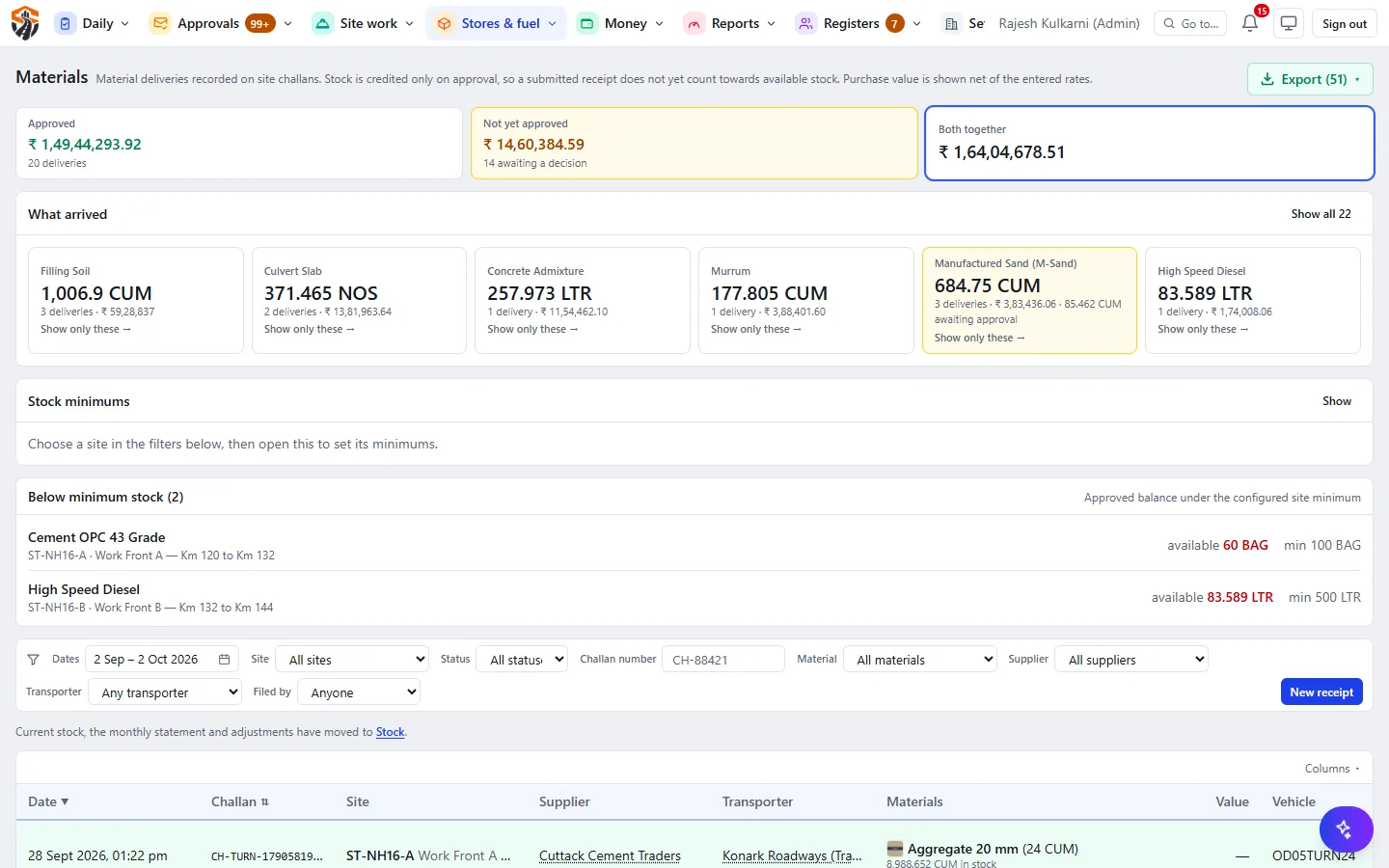
Deliveries arrive against a challan and a site, and the stock figure waits for a decision.

  • Receipts recorded against a delivery challan, a site and a chainage, with the vehicle and supplier.
  • Stock is credited on approval — not when the entry is typed on the phone.
  • Consumption, site transfers and stock adjustments all move the same balance.
  • Stock below the minimum your company configured for a site is raised against that minimum.
SiteMax web app — materials, showing deliveries by challan and stock against site minimums

Demo-environment data

03 Daily reports

One daily report per site, per day.

What was built, who was there, and the proof behind it — filed against the day it happened.

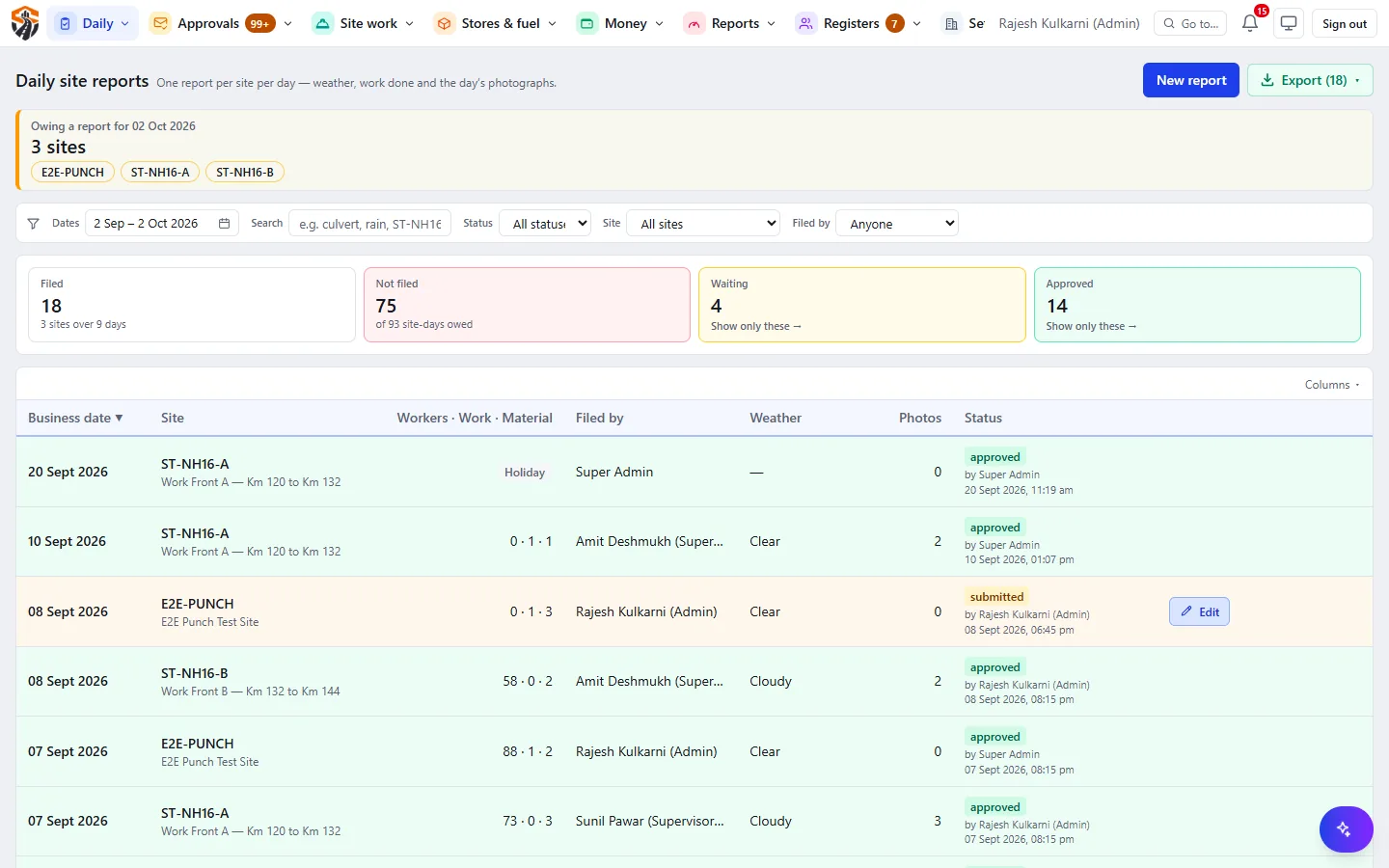
  • Filed, not filed and waiting, across every site and every day.
  • Labour by trade, work items and chainage, site photos and bill-backed expenses.
  • AI drafts the narrative from the day’s own entries; the supervisor edits it before filing.
  • A report still missing after your filing deadline is raised that evening, against the site.
SiteMax web app — daily reports, showing filed and outstanding reports by site and day

Demo-environment data

Android + Web

On the ground.
In the office.

Real screens from both applications, in a demo environment. Pick one, or open it full size.

SiteMax for Android

  • Offline entry capture
  • Site attendance
  • Photos & expense bills
  • Sync when connected
Get it on Google Play →

Android · Home · demo-environment data

SiteMax for Office

  • Cross-site visibility
  • Named approval workflows
  • Costs, ledgers & billing
  • Permissions & audit history

Pending approvals, cash with staff and this month's approved costs.

The platform

One operation.
Every moving part.

Six areas that share the same sites, people, records and approvals.

01Site reporting & progressOne daily report per site, with the work, people and proof behind it.

Daily reports, AI-assisted narrative summaries, labour by trade, work items and chainage, site photos, and bill-backed expenses.

02Attendance & workforceKnow who punched in, where, and which punches need a second look.

Location-stamped punches, optional face-verified attendance, flagged-punch review, attendance approval, and punch-gated entry screens.

03Materials, fuel & fleetStock and fuel counted on approval, with warnings when numbers drift.

Receipts and consumption, delivery challans, site transfers, stock adjustments, fuel receipts and issues, pump stock, meter warnings, trips, and vehicle-day sheets.

04Approvals & accountabilityEvery record has a named owner, and every change leaves a trail.

Named approvers, claim-before-review, bulk approvals, rejection reasons, audited corrections, reopening and reversal workflows, and controlled back-date windows.

05Cash, payments & ledgersSee who holds company money and what each supplier is owed.

Expenses, imprest and cash advances, per-person balances, supplier and transporter ledgers, payment approvals, bank reconciliation, and subcontractor measurement and payment.

06Commercial & project costsFollow a job from tender and BOQ through billing and margin.

Tenders, projects, BOQ revisions and rates, client billing, historical rate masters, earnings and margin reporting.

Works without a signal

  • Daily progress
  • Attendance punches
  • Material receipts
  • Fuel issues
  • Photos
  • Site expenses

Needs a connection

  • Maps
  • AI drafting & extraction
  • Approvals

Anything that cannot sync is listed on the app’s sync-issues screen for the supervisor to fix.

Access & privacy

Give each person the access their work requires.

Connected teams. Clear boundaries. Your company decides who can see, record and approve.

Company data isolation

Each contractor's data is kept separate from every other company on SiteMax.

Fine-grained permissions

Grant access by role, site and task. Who sees costs, rates, ledgers and margins is controlled, and tender details are separate from tender financials.

Audit trails

Creation, corrections and approvals are recorded with who and when.

Sessions you can see

Login history, active sessions, and remote session revoke.

Confidential documents

Sensitive documents are visible only to people granted access.

No analytics trackers

SiteMax does not include third-party analytics trackers.

Practical AI

Less repetitive work. More useful context.

AI drafts, extracts and suggests. People review, edit and decide.

Daily-report summaries

Turns the day's entries into a readable narrative draft for the supervisor to edit.

Document data extraction

Reads challans and bills to pre-fill fields. Every value can be checked and corrected.

In-app assistance

Answers "where do I…" questions using your own pages and settings.

What it is

SiteMax, in plain terms.

SiteMax is construction site management software for road-construction and infrastructure contractors in India. It joins an offline-first Android app used on site to a web application used in the office, so the day’s work is recorded where it happens and reviewed where the decisions are made.

Who uses it

Supervisors, site engineers and storekeepers record work from the field. Project managers, fleet managers, accounts staff and management review those records, handle contractor workforce management and project costs, and raise client bills. Accounts are issued by the employing company — there is no public sign-up, and people sign in with a one-time code sent on WhatsApp.

How the site and the office connect

A supervisor files road-construction reporting against a site and chainage: daily progress, attendance, material receipts, fuel issues, vehicle meter readings, photos and site expenses. Supported entries queue on the phone when there is no signal and sync when it returns; maps, AI features and approvals need a connection. Each synced record goes to a named approver, who claims it before reviewing and then corrects, approves or rejects it with a reason. Only approved records move into project costs, stock, progress and billing.

What it keeps track of

Daily reports and work progress, site attendance, material and fuel tracking with stock balances, vehicle and equipment activity, site expenses and cash with staff, project approvals, project costs, BOQ and client billing. Rule-based checks run on a schedule and raise an exception — a stock shortfall, a report not filed, a reading outside its band — to a named owner. They compare records against thresholds your company sets; no predictive model decides what is wrong.

FAQ

A few things
worth knowing.

From working without a signal to keeping company data private.
Talk through your setup →

What is SiteMax?

SiteMax is a site-operations and workforce platform for road-construction and infrastructure contractors in India. Field teams record the day’s work in an Android app; office teams review and approve those records in a web application, and run project costs, BOQ and client billing from them.

Can field teams enter records without a signal?

Yes, for supported field entries. The Android app saves them on the phone, shows how many are waiting, and syncs them when the connection returns. Maps, AI features and approvals need a connection.

How do employees get access?

There is no public sign-up. Your company creates each account, and people sign in with a one-time code sent on WhatsApp.

How do approvals work?

Records go to named approvers. An approver claims a record, reviews it, and can correct, approve or reject it with a reason. Corrections are audited, and approved records can be reopened or reversed through a controlled workflow.

When does background location tracking run?

Only when the company has enabled it, the individual has consented, and the person has an active site punch.

How can our company request a demo?

Use the Book a Demo form on this page and tell us about your sites. We will arrange a walkthrough of the Android app and the web application.

Bring your sites and office
onto the same page.

See how SiteMax fits your reporting, approval, and project-control workflows.

Office hours

Monday–Saturday, 9:00 AM–7:00 PM
Sunday, 10:00 AM–4:00 PM IST

Fibermax Services Pvt Ltd
GC-139, RCMS Complex, Civil Township,
Rourkela, Odisha 769004, India

fibermax.co.in

Book a DemoWe reply within a working day